

Hi all! I hope this is ok to post!
My kids wanted to make custom icons for their MYO cards so I built an iOS app to make it quick and easy, especially for a child, rather than needing to use a complex art package. I thought I'd share it with the community and I'd love your feedback.
This is my first ever iOS app! - Pixel Draw 16x16.
Most pixel tools are either overkill (layers, huge canvases, subscriptions) or fiddly on a phone. I wanted a super simple "open app → draw icon → export" in about 30 seconds that my kids could easily do themselves.
It's paid (one-off, no ads, no subscription), £0.99/$0.99.
What it does
• 16x16 grid with a simple palette
• Tap to draw, simple undo/erase, undo
• Edit easily at a large drawing size
• Easy save to Photo library and export of the finished image which you can easily use as an icon for Yoto Player (or anything else)
App Store link: https://apps.apple.com/gb/app/pixel-draw-16x16/id6759076179
I would love any feedback - especially on the Ul, functionality and what would make exporting/using icons smoother.
I would be really interested if this is useful for people, and I hope people have fun using it :)
I am independent of Yoto, this is unofficial and not associated or endorsed in any way, and there is currently no direct integration.
Cheers! Simon
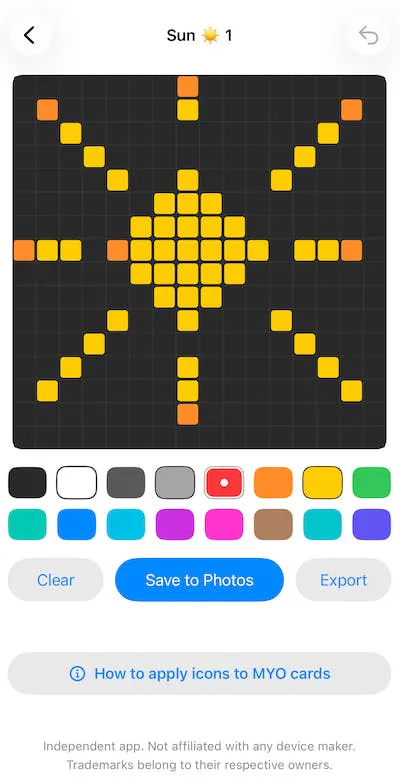
I've got an update coming to the store with:
extended palette,
user-definable colours with colour pickers,
several predefined brushes,
manual and automatic backups & restore, plus share to other apps,
multi-select delete,
redo function.
---------
Hi all,
I've released another update 1.3 now live in the store with the following:
* Added support for importing 16x16 PNG images to edit directly
* Added PNG transparency
* Added 'ghost' image to trace over
* Added eye dropper tool to quickly select a colour
I'd love feedback and any suggestions!
Happy drawing! :)